PDF Reader - Annotate Docs
- 3.3
- Rating
- 50.00K
- Installs
- Free
- Price
 Analysis by App-foxy
I usually judge a document app by what happens after the first few days. Opening a PDF is easy; the harder question is whether the app still feels useful when the novelty wears off, when a file needs a quick note, and when I have to find an older document without wasting time. PDF Reader - Annotate Docs, from The Galaxy Info, is aimed at that everyday space. It is a free personalization app for reading, annotating, editing, and managing PDF documents, with an Everyone age rating and support for devices running Android 8.0 or later.
My first impression is straightforward: this is a practical tool rather than an app that tries to turn document work into a complicated project. The current release is version 1.0, and its appeal comes from keeping common PDF tasks together. I can imagine using it for a school handout, a form that needs checking, a work document that requires comments, or a saved receipt that I want to mark before sending it elsewhere.
That simplicity is also the central question. A dedicated PDF app has to earn a permanent place beside the phone’s file manager, browser, cloud storage, and office tools. In my experience, PDF Reader - Annotate Docs has a reasonable chance for people who want a focused document utility, but its long-term value depends heavily on how often they actually annotate or organize PDFs instead of merely opening them.
You May Also Like

 Blood Strike: 2.5 Anniversary
Blood Strike’s Loadouts Turn Every Drop Into a Tactical Gamble
A close look at Blood Strike’s custom loadouts: how fast access to signature weapons reshapes its battle royale rhythm, rewards preparation, and narrows the gap between fights.

 Pandora - Music & Podcasts
Pandora’s Music Is Easy to Start, but Harder to Recover
Pandora’s strength is its low-effort path from a seed to a station. Its weak spot is how much confidence it asks you to place in connection, setup, and quiet recovery.

 8 Ball Pool
8 Ball Pool Is Built on Rivalries, Rematches, and Routine
A close look at the rivalries, rematches, shared routines, and unanswered safety questions that turn a quick pool match into a persistent mobile community.

 Samsung Music
Samsung Music’s Quiet Strength Is Playing What You Already Own
Its reach comes less from spectacle than from dependable access to a personal library. That simplicity is both the app’s strongest retention engine and its ceiling.

 AccuWeather: Weather Radar
AccuWeather Review: A Quick, Clear Forecast for Everyday Decisions
For everyday plans, the best forecast is the one you can understand quickly. AccuWeather makes rain timing, radar, and local conditions easy to act on, with a few trade-offs.

 Hill Climb Racing
Why Hill Climb Racing Still Turns Crashes Into One More Run
A tiny car, a bumpy hill and one more upgrade: Hill Climb Racing keeps resurfacing because its simple chaos makes every near-miss feel personal.
More From Our News Desk



What the first week feels like
During the first week, the most attractive part is the combination of reading and working on the same document. I do not have to treat a PDF as a file that can only be viewed. The ability to read, annotate, edit, and manage documents gives the app a more active role, especially when I am reviewing material rather than simply consuming it.
A realistic example is a student receiving a long assignment as a PDF. Instead of printing it or switching between a reader and a separate note-taking app, the student can use the document as the working surface: read a section, add a reminder, mark a point to revisit, and keep the file available for later review. That workflow is more valuable than the short store description suggests because the benefit comes from reducing small interruptions.
I also see a useful scenario for someone handling household paperwork. Imagine receiving a PDF bill, insurance document, or application form. The first pass might involve reading it carefully, marking a question, and adding a note about a missing detail. A focused PDF tool can make that process feel less scattered than opening the file in a browser and then trying to remember comments in a separate notes app.
The annotation angle is particularly important. Reading alone is already possible through many built-in viewers, so the app needs to justify itself through active document handling. If I am only opening a PDF once, the difference may be small. If I return to the same file several times and need to leave visible reminders, the value becomes much clearer.
One practical habit is to annotate with a purpose rather than marking everything. I would use one style of note for questions, another for decisions, and a short written comment when a highlight is not enough. This keeps a document useful later instead of turning it into a page covered with marks that no longer make sense. The app’s usefulness therefore depends partly on how disciplined the reader is.
The app’s free price lowers the barrier to trying this workflow. I can test whether it fits my routine without treating the decision like a major purchase. That matters for occasional users who need a PDF utility only from time to time. It also makes the app easier to recommend to someone who wants to experiment with annotating documents rather than committing immediately to a larger office suite.
Still, I would not confuse a good first week with proof of lasting value. A new reader often feels useful simply because it offers a fresh place to open files. The real test is whether it saves time after I have already learned its basic controls. That is where recurring document habits matter more than the initial impression.
Where it fits beside familiar alternatives
Compared with opening PDFs in a browser, a dedicated reader makes more sense when I need to return to a file, add comments, or keep document work separate from web browsing. A browser is convenient for a quick look, but it is not always the most comfortable place for repeated review. PDF Reader - Annotate Docs is better suited to the moment when a document becomes something I need to work through.
Compared with a full office suite, the smaller focus can be an advantage. Office apps are useful when I am creating or heavily revising documents across several formats, but they may feel excessive for someone who mainly reads and marks PDFs. This app is a more sensible starting point for a reader whose main material already arrives in PDF form.
On the other hand, people who already depend on a large cloud-based document ecosystem may prefer staying inside that ecosystem. If sharing, synchronized work, advanced document conversion, or broad collaboration tools are central to the job, a focused PDF reader may not replace the established solution. I would use this app for direct PDF work, not assume it is a complete replacement for every office or storage service.
What remains useful after the novelty fades
Month-to-month value comes from repeated small tasks. I do not need to use the app every day for it to earn space; I need it to be dependable whenever a PDF requires more attention than a quick glance. That could mean reviewing study material each week, checking forms during a recurring administrative task, or keeping notes on reference documents that I revisit over time.
The strongest recurring use case is a personal review loop. I can open a document, read it in stages, add annotations while the details are fresh, and return later with a clearer sense of what still needs attention. This is more useful than taking disconnected notes because the comments remain associated with the relevant page or passage.
A second non-obvious use is preparing a document before a conversation. I might read a contract, meeting handout, or project brief and mark the exact points I want to discuss. The app becomes a preparation tool rather than merely a storage location. Before the meeting, I can revisit the marked areas instead of searching through a separate notebook for page references.
A third useful workflow is separating temporary review from permanent notes. I would first annotate the PDF with quick questions and decisions, then transfer only the lasting information into my main notes system. This avoids filling a general notes app with copied passages while preserving the original context during review. It is a small distinction, but it can make document-heavy work easier to manage.
For families or shared devices, the Everyone rating makes the app approachable for general household use. A parent could use it for school documents, while another person uses it for forms or manuals. That broad audience is helpful, although the app’s practical suitability still depends on each person’s preferred way of storing and sharing files.
The public response is modest so far: the app has a 3.5 average from around 18 ratings and has passed 10K installs. I read that as an early signal rather than a final judgment. There is enough adoption to show that people are trying it, but not enough history for me to treat the rating as a settled picture of long-term reliability. The limited review volume also means I would personally test the exact workflow I need before moving important document habits into it.
That early stage affects my expectations. Version 1.0 can be perfectly usable while still feeling like a starting point. For a casual reader, that may be fine. For someone whose work depends on advanced document handling, I would be more cautious and keep important originals backed up independently rather than relying on one app as the only place where annotated material exists.
Questions I would answer before settling in
One obvious question is whether the app is suitable for occasional use. I think it is, especially for people who want a free way to read and mark PDFs without adopting a broad office platform. Occasional users should keep their workflow simple: open the document, make only the annotations they need, and store the finished file where they can find it again.
Another question is whether it replaces a full document suite. In my view, no—not for every user. It is a better match for PDF-centered reading and review than for people who need a complete system for creating, converting, collaborating on, and distributing many kinds of files. The right choice depends on whether PDF annotation is the main task or just one small part of a larger office routine.
People may also wonder whether it is appropriate for sensitive documents. I would treat it like any other document app and think carefully before opening highly confidential material. The safest habit is to keep original copies in a trusted location and avoid making an app the sole home for records that would be difficult to replace.
Finally, Android compatibility is reasonably broad because the app supports Android 8.0 and later. That should cover many older devices, but I would still check the specific phone or tablet I plan to use before building a serious workflow around it. Screen size matters too: reading and annotating can feel very different on a compact phone compared with a larger tablet.
The maintenance cost and the points that create fatigue
The maintenance burden is not only about updates. It is also about keeping files understandable after several weeks of use. An annotation app can become messy when I save multiple versions with unclear names or forget which copy contains the latest comments. My best approach would be to use consistent filenames and a simple folder structure outside the immediate reading session.
This is where the app’s management function matters in practice. Managing PDFs is useful only when it helps me retrieve the right document later. I would group files by purpose rather than by the date I happened to download them. For example, study material, household records, and work references should not become one indistinguishable stream. A small amount of organization at the start prevents the app from becoming another crowded drawer.
There is also a maintenance trade-off between fast annotation and careful annotation. Quick marks are convenient, but they can become confusing when I return to a document months later. I would add short context to important notes, especially when the annotation records a decision rather than a simple reminder. “Check this” is much less useful later than “confirm the delivery date before signing.”
Potential fatigue comes from repetition. If every document requires several steps to locate, open, mark, save, and share, I may eventually return to a familiar browser or office app even if this reader is more focused. The app earns lasting space only when its focused workflow feels faster than the alternatives for my actual documents.
Another source of fatigue is using a phone for long PDFs. A mobile screen is convenient for a quick correction or a short review, but extended reading can be tiring. I would consider this app a strong companion for short sessions and targeted annotations, while a tablet or larger display may be the better environment for lengthy technical material.
Annotation itself can also become excessive. Highlighting every important sentence removes the distinction between important and ordinary content. I would limit marks to decisions, questions, definitions, and passages I genuinely expect to revisit. That habit makes the app feel more like a review tool and less like a digital highlighter with no follow-through.
Because the app is from The Galaxy Info and currently at version 1.0, I would pay attention to how it develops over time. That is not a criticism of the current release by itself; it is a reminder that a document tool becomes more trustworthy through continued use. For me, a lasting place on the device requires a stable routine, predictable handling of saved work, and improvements that address real friction rather than adding complexity for its own sake.
Who should use it, and who should skip it?
I would recommend giving PDF Reader - Annotate Docs a try if you regularly read PDFs and want to add practical notes without installing a broad productivity suite. Students, casual document reviewers, household organizers, and people who receive forms electronically are the clearest audience. The free price makes experimentation easy, and the Everyone rating supports its role as a general-purpose personal tool.
I would be less likely to recommend it as the only document solution for a professional workflow that depends on advanced collaboration, extensive conversion, or a deeply integrated cloud office environment. Those users may be better served by the platform they already use, even if it is less focused. I would also skip it if I only need to view a PDF once in a while and my existing viewer already handles that without friction.
The deciding factor is not the number of functions on paper. It is whether annotation and document management occur often enough to justify a separate habit. If I mark several files each month, the focused workflow can repay the small effort of learning it. If I merely open PDFs occasionally, another installed app may add more clutter than value.
My long-term verdict
After the first-week appeal fades, PDF Reader - Annotate Docs still has a clear reason to exist: it treats PDFs as working documents rather than passive pages. That distinction gives it recurring value for review, study, forms, and reference material. I especially like the idea of keeping notes close to the text and using a repeatable process to turn a document into something I can act on.
My reservations are equally practical. The app is young, its public rating sits at a middling 3.5, and the early review history is small. I would not make it the single place for irreplaceable documents until it had proved itself in my own routine. I would also avoid expecting it to replace a complete office platform or eliminate the need for sensible file organization.
For me, the lasting-space test is a qualified yes. I would keep it installed if I were regularly annotating PDFs, because that use case is specific enough to make a focused reader worthwhile. I would not keep it simply because it can open files; many alternatives can do that. Its real value appears when reading turns into reviewing, questioning, and preparing a document for the next action.
If your PDF needs are occasional and simple, try it without changing your whole setup. If you handle documents repeatedly, give it a month with a clear naming and annotation routine. That trial will tell you more than the initial download: either the app becomes a dependable part of your document habit, or you discover that your browser, file manager, or existing office suite already does enough.
Overall, I see PDF Reader - Annotate Docs as a sensible free option for focused PDF work, with the most promise for people who need to read and mark documents rather than merely view them. It is not an automatic replacement for every alternative, but its combination of reading, annotation, editing, and management gives it a useful place in the right routine. For that audience, PDF Reader - Annotate Docs is worth testing—and worth keeping only if it continues to save real effort after the novelty disappears.
FAQs for PDF Reader - Annotate Docs
01What is PDF Reader - Annotate Docs used for?
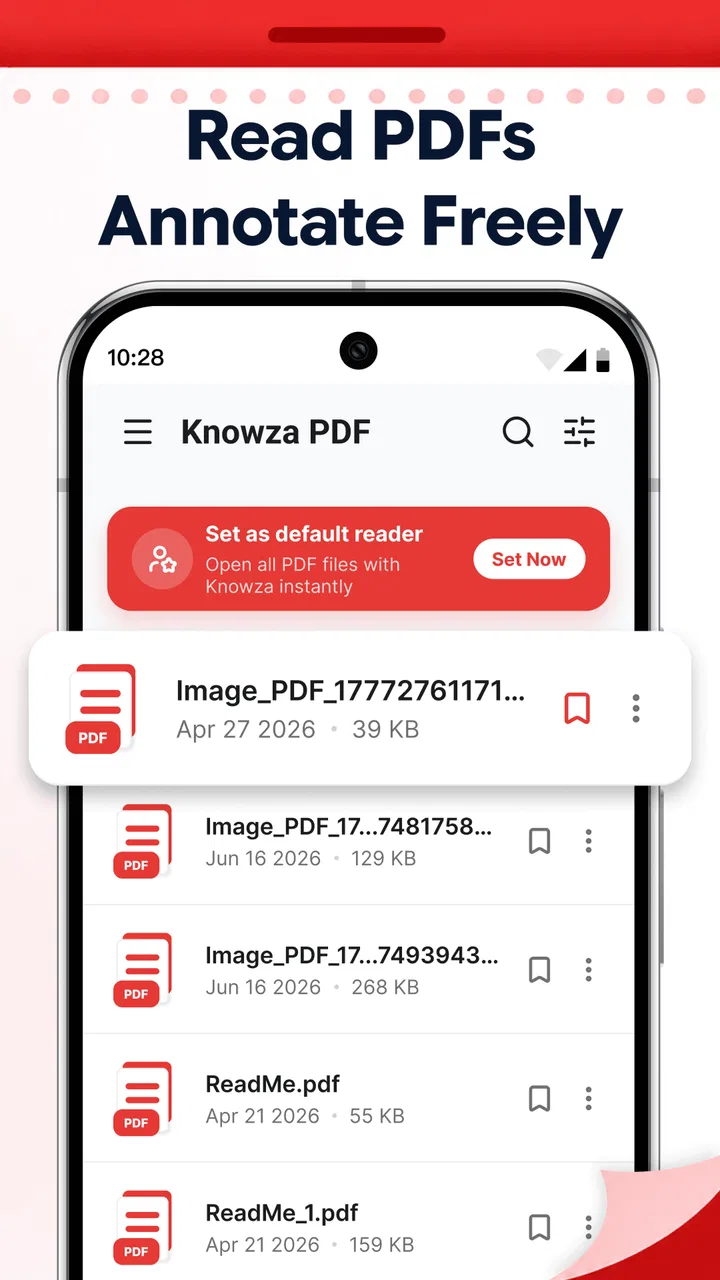
PDF Reader - Annotate Docs is designed for opening, reading, organizing, and working with PDF files on a mobile device. During testing, it proved useful for viewing documents, searching for text, zooming into pages, and keeping important files accessible. Its annotation tools also let users highlight passages, add notes, draw on pages, and mark information for later reference, making it suitable for study, work, and everyday document management.
02Can I annotate PDF files with highlights, notes, or drawings?
Yes. The app is built not only for reading PDFs but also for marking them up. Depending on the document and available tools, users can highlight text, underline important sections, add comments, write notes, and use freehand drawing features. These options are helpful when reviewing contracts, studying course material, completing forms, or leaving feedback. Before saving, check that your annotations appear correctly on the page.
03Does PDF Reader - Annotate Docs work without an internet connection?
The app can generally be used offline for PDF files that have already been downloaded or stored on your device. Reading, zooming, and many annotation functions do not normally require a continuous internet connection. However, downloading documents from cloud services, synchronizing files, accessing online storage, or using certain account-related features may require internet access. Offline availability can also depend on the file location and app version.
04Can I open and manage PDFs from other apps or cloud storage?
PDF Reader - Annotate Docs is intended to work with files received through common sharing options, such as email, messaging apps, file managers, and document storage services. You can usually open a PDF using the system share menu or import it into the reader for easier access. Cloud integration and supported services may vary by platform, so users should review the app’s current permissions and compatibility before moving a large document library.
05Is PDF Reader - Annotate Docs free, and are there any limitations?
The app may be available as a free download, but some features can be restricted depending on the version, device, or subscription model. Advanced annotation tools, document organization, cloud synchronization, exporting, or an ad-free experience may require an in-app purchase. Before downloading or subscribing, review the store listing carefully for pricing, trial terms, recurring billing details, supported devices, and any limits affecting the number or type of PDFs you can manage.
Pros
- Opens PDFs quickly
- even when switching between several documents.
- Annotation tools make it easy to highlight
- underline
- and add notes.
- Search helps locate specific words or phrases in lengthy documents.
- Supports comfortable reading with zoom and page navigation controls.
- Useful for reviewing documents while traveling or away from a computer.
Cons
- Some advanced annotation or editing features may require a paid upgrade.
- Large
- image-heavy PDFs can take longer to load on older devices.
- The interface may feel crowded when many document tools are visible.
- Cloud or file-sharing options may depend on the device and installed apps.
- Battery use can increase during extended reading or annotation sessions.

PDF Reader - Annotate Docs
Gallery